
Home › Custom forms

Custom forms · per job type

The right form for the job, every time.

Pick from 13 solar starter templates — PV install, DHW service, reroof, permit final, and more — or build your own with conditional logic. Stack multiple forms on one work order when a single visit covers more than one thing.
Start free trial →7 days free · No credit card
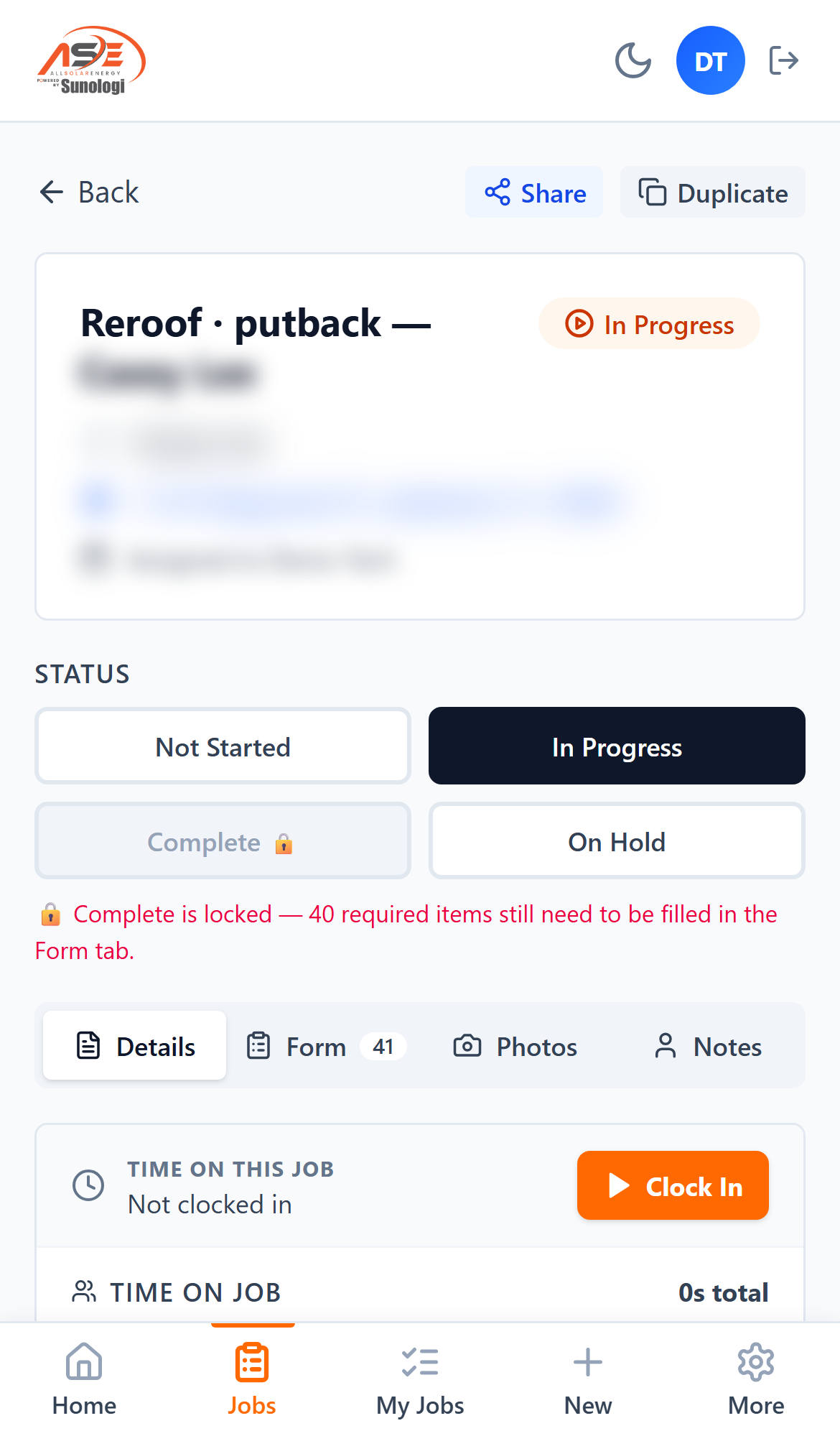
SolarProjeX mobile job screen showing Complete locked until 40 required form items are filled in
The completion gate on a real job: Complete stays locked until every required item is captured. Customer details blurred.

A generic checklist misses what solar techs actually need to capture.

Field service forms built for HVAC or general home services don't ask the right questions for a PV install, a solar pool heat diagnostic, or a permit final inspection. Techs either skip fields that don't apply or miss ones that do.

SolarProjeX ships 13 solar-specific starter templates — PV install, DHW service, PV takedown/putback, pre-site survey, battery install, reroof coordination, discovery audit, and more — or your team can build a custom form with conditional logic so fields only appear when they're relevant. Multiple forms can stack on one work order for a visit that covers more than one job type, and required fields and photos gate the job from being marked complete until they're captured.

  • 13 solar-specific starter templates, ready to assign to a job type
  • Build custom forms with conditional logic — fields show only when relevant
  • Stack multiple forms on one work order for multi-line service calls
  • Required fields and photos block completion until they're captured
  • Versioned templates with a draft/publish workflow, so a form can be revised without breaking jobs already using it

How it works

Built for solar service jobs, not installs in general.

📋

13 solar starter templates

PV install, DHW service, reroof, permit final, and more — ready to assign out of the box.

🔀

Conditional logic

Fields appear only when relevant, so techs aren't scrolling past questions that don't apply.

📚

Stack forms on one job

A multi-line service call can carry more than one form on the same work order.

Required-field gating

A job can't move to Complete until every required field and photo is captured.

Frequently asked questions

Can we build our own form, or only use the starter templates?

Both — start from one of 13 solar starter templates or build a custom form from scratch, with conditional logic for fields that only apply sometimes.

What happens if a tech skips a required photo?

The job can't be marked complete until every required field and photo is captured.

More SolarProjeX built for solar

Field paymentsCard, pay-by-link, and payout to your bank Invoicing & collectionsContract lifecycle and a live owed board Customer reportsBranded PDF plus a secure share link Dispatch & schedulingMission Control board and live tech map Payroll & paysheetsRate catalog and payroll sheet sync SolarProjeX vs JobNimbusSolar service vs a roofing CRM SolarProjeX vs ServiceTitanSolar-native vs enterprise HVAC software SolarProjeX vs Housecall ProSolar-native vs generic home services SolarProjeX vs JobberSolar operations vs generalist SMB software Call Desk & customer dialerScored outbound queue, click-to-call, and automatic call logging Solar thermal operationsSPH & DHW equipment tracking with guided tech diagnostics Features matrixSolarProjeX vs traditional PV-only field service software Permit boardPermit status by AHJ, stage, and the tech who moved it Permit number auto-matchPublic-records matching across 405 jurisdictions, by address SunHub customer portalBranded homeowner portal — equipment, documents, live production RMA & warranty boardFailed-equipment claims tracked from submission to reimbursement Bill-to managementMulti-account billing — roofers, GCs, and homeowners on the same address Report DesignerBuild, save, and share custom operational reports Reconciliation engineCross-checks jobs, invoices, and payments — surfaces what doesn't line up Team ChatJob-linked messaging for crew and office, built into the platform GPS photo captureAuto-GPS, auto-timestamp, burst mode, sample overlays Smart clock-in / clock-outGPS-aware time tracking, audit-ready by default Roles, permissions, audit trailCustom roles, a toggleable permission matrix, complete-gating White-label your domainSelf-serve custom domain with auto-provisioned SSL Reviews & rank trackingAutomatic review requests plus a built-in local rank heatmap Integrations19+ native integrations, plus Zapier for 6,000+ more apps Visual workflow automationNo-code, drag-and-drop automation canvas Fleet trackingLive GPS, geofenced auto clock-in/out, optional Geotab integration SolarProjeX vs Service FusionSolar-native vs a generalist trade FSM

Run your solar service on one platform.

Start free in 30 seconds. No credit card. Cancel anytime.

Start your free trial →