Home › Fleet tracking

Fleet-aware

Fleet-aware. Not fleet-required.

If you run company trucks, SolarProjeX tracks them: live GPS positions, geofenced auto clock-in when the truck rolls, auto clock-out when it returns home. If you don't run a fleet, none of this gets in your way.
Start free trial →7 days free · No credit card
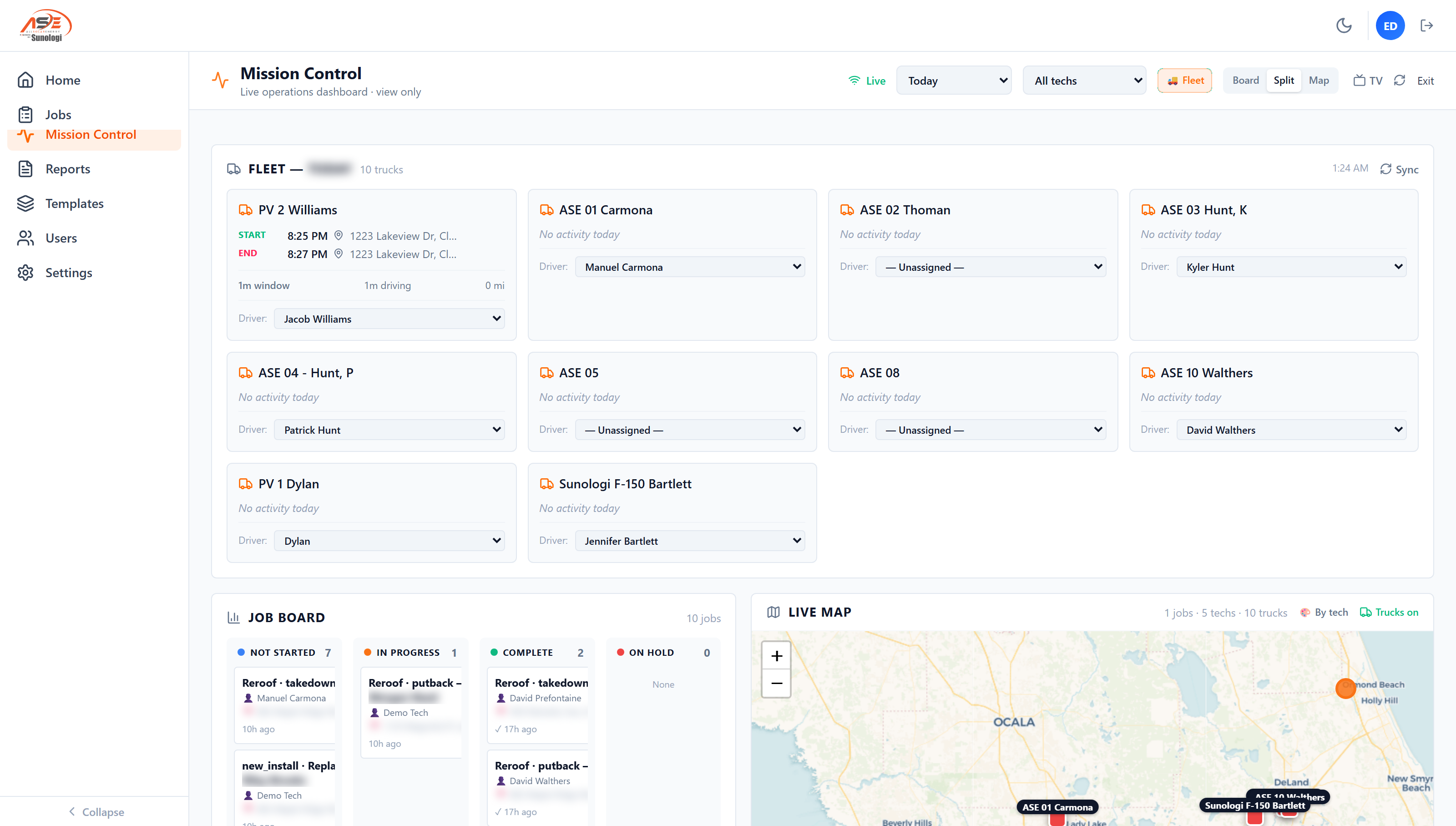
SolarProjeX Mission Control showing live fleet truck cards, assigned drivers, the job board, and a live map of trucks and techs
Mission Control in production at AllSolar Energy — fleet cards, driver assignment, and the live map. Customer names blurred.

A truck's position is a fact. Most shops still track it by asking.

Knowing where a crew's trucks actually are, and whether they made it to the job site on time, usually means calling or texting to ask. For a shop running more than a couple of trucks, that doesn't scale, and it puts the office in the position of trusting a tech's memory of when they arrived and left.

SolarProjeX makes fleet tracking optional, not required — the rest of the platform works exactly the same without it. For shops that do run company trucks, connecting the fleet turns every truck into a live unit of work: GPS position on the dispatch map, automatic clock-in when the truck arrives at the job site, and automatic clock-out when it returns to home base. No tech ever touches a timesheet.

  • Live truck positions on the dispatch map
  • Geofenced auto clock-in when a truck arrives at the job site
  • Geofenced auto clock-out when a truck returns to home base
  • Daily truck cards: start/end time, distance, hours
  • Driver assignment by name — auto-matched, manually overridable
  • Integrates with Geotab; fleet features are an optional add-on, not required to use the platform

How it works

Every truck becomes a unit of work — if you want it to.

🚚

Live positions

See every truck on the same dispatch map as your jobs, in real time.

📍

Geofenced clock-in

A truck arriving at the job site clocks the tech in automatically — no manual step.

🏠

Auto clock-out

Returning to home base clocks the tech back out, just as automatically.

📊

Daily truck cards

Start/end time, distance, and hours per truck, summarized automatically each day.

Frequently asked questions

Do we need company trucks to use SolarProjeX?

No — fleet tracking is optional and available as an add-on. The rest of the platform works fully without it.

What fleet hardware does this require?

SolarProjeX integrates with Geotab for live GPS and truck data.

More SolarProjeX built for solar

Field paymentsCard, pay-by-link, and payout to your bank Invoicing & collectionsContract lifecycle and a live owed board Customer reportsBranded PDF plus a secure share link Dispatch & schedulingMission Control board and live tech map Payroll & paysheetsRate catalog and payroll sheet sync SolarProjeX vs JobNimbusSolar service vs a roofing CRM SolarProjeX vs ServiceTitanSolar-native vs enterprise HVAC software SolarProjeX vs Housecall ProSolar-native vs generic home services SolarProjeX vs JobberSolar operations vs generalist SMB software Call Desk & customer dialerScored outbound queue, click-to-call, and automatic call logging Solar thermal operationsSPH & DHW equipment tracking with guided tech diagnostics Features matrixSolarProjeX vs traditional PV-only field service software Permit boardPermit status by AHJ, stage, and the tech who moved it Permit number auto-matchPublic-records matching across 405 jurisdictions, by address SunHub customer portalBranded homeowner portal — equipment, documents, live production RMA & warranty boardFailed-equipment claims tracked from submission to reimbursement Bill-to managementMulti-account billing — roofers, GCs, and homeowners on the same address Report DesignerBuild, save, and share custom operational reports Reconciliation engineCross-checks jobs, invoices, and payments — surfaces what doesn't line up Team ChatJob-linked messaging for crew and office, built into the platform GPS photo captureAuto-GPS, auto-timestamp, burst mode, sample overlays Custom forms per job type13 solar starter templates, conditional logic, required-photo gating Smart clock-in / clock-outGPS-aware time tracking, audit-ready by default Roles, permissions, audit trailCustom roles, a toggleable permission matrix, complete-gating White-label your domainSelf-serve custom domain with auto-provisioned SSL Reviews & rank trackingAutomatic review requests plus a built-in local rank heatmap Integrations19+ native integrations, plus Zapier for 6,000+ more apps Visual workflow automationNo-code, drag-and-drop automation canvas SolarProjeX vs Service FusionSolar-native vs a generalist trade FSM

Run your solar service on one platform.

Start free in 30 seconds. No credit card. Cancel anytime.

Start your free trial →